
On top of the general importers registry (padrón), certain sensitive goods require enrollment in a specific sector registry (padrón sectorial). If your product falls into one of these sectors and you don’t have it, your cargo simply cannot clear customs — and you find out at the port, with the shipment racking up storage charges.
Sectors that require it (the most common)
- Chemicals and precursors
- Alcohol and alcoholic beverages; beer; tobacco
- Footwear and textiles/apparel
- Steel and steel products
- Hydrocarbons and fuels
- Firearms, explosives and fireworks (with extra regulation on top)
The exact list gets updated — the reference is Annex 10 of the current foreign-trade rules (RGCE). Not sure whether your tariff code sits in a sector? Look it up in our tariff calculator: the regulatory profile shows your code’s requirements.
How to get enrolled (official 2025 guide, with screens)
- First, have your general importers registry active, and log in to the same SAT registries portal with e.firma or password.
- On the form, validate your broker authorizations (at least one license) and click Incorporar sectores específicos a su solicitud (“add specific sectors to your request”).
- In the sector table, check the box for the sector you need under the Seleccionar column. If you’re already enrolled in other sectors, do not uncheck them — unchecking cancels that enrollment.
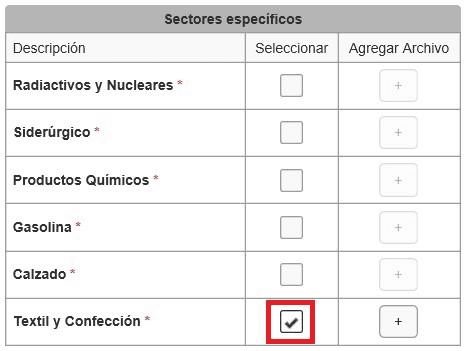
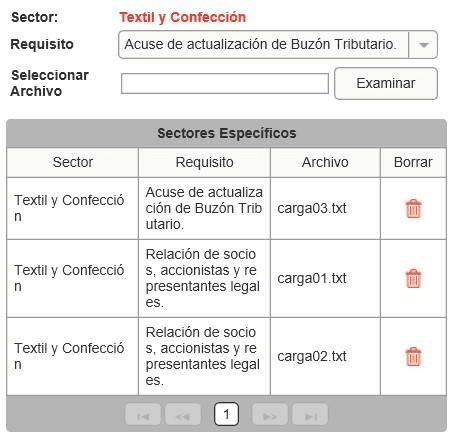
- For each sector, use Agregar archivo (+): pick the Requisito (requirement) from the menu and attach the document with Examinar. Per-sector requirements are in form 6/LA of Annex 2 of the foreign-trade rules (supplier lists, permits from COFEPRIS/SEDENA/SE as applicable).
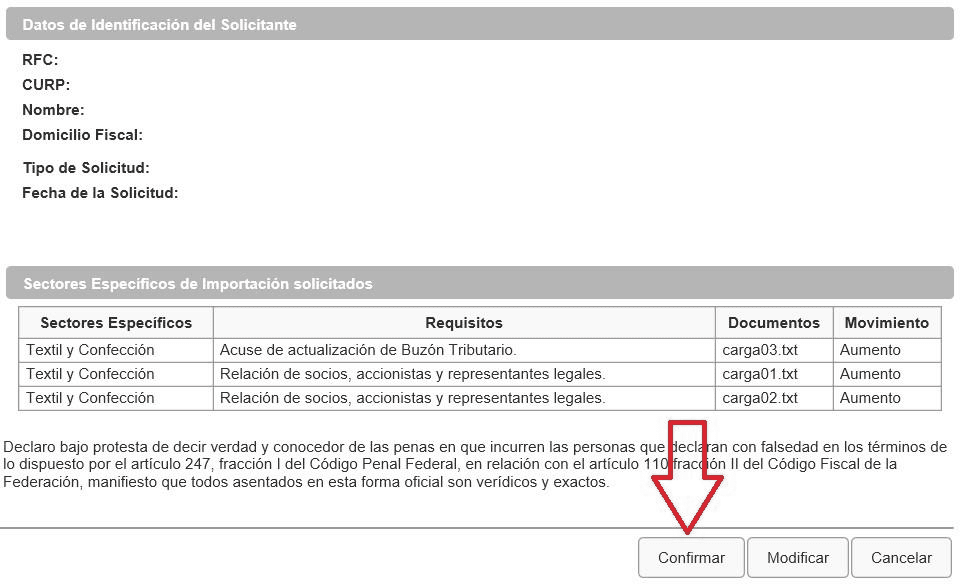
- Hit Enviar, review the summary and Confirmar; sign with your e.firma, Concluir solicitud and Generar acuse.
- The outcome posts to the SAT portal within 10 business days — longer if they ask for additional information.
Practical advice
Footwear, textiles and steel see frequent suspensions over undervaluation. Keep your value file spotless (invoices, payments, value declaration) — it’s your best defense for staying enrolled.
Is your product in a sensitive sector? Write to us and we’ll build the sector file with you.