
To import goods into Mexico commercially, you need to be enrolled in the tax authority’s (SAT) importers registry (padrón de importadores). The filing is free and 100% online — but it comes with tax-standing requirements worth checking beforehand, because any inconsistency stops it cold.
Requirements
- An active RFC (Mexican tax ID), with your registered tax address verified as “located”
- A valid e.firma (Mexico’s e-signature)
- A positive tax-compliance opinion (the 32-D report): current on all your tax obligations
- A tax regime compatible with importing (e.g. business activities)
- An active tax mailbox (buzón tributario) with validated contact details
Step by step (SAT’s official 2025 guide)
- Check that your tax-compliance opinion is positive, your tax address shows as “Localizado” and your tax mailbox (Buzón Tributario) is “Validado” — the SAT validates all three.
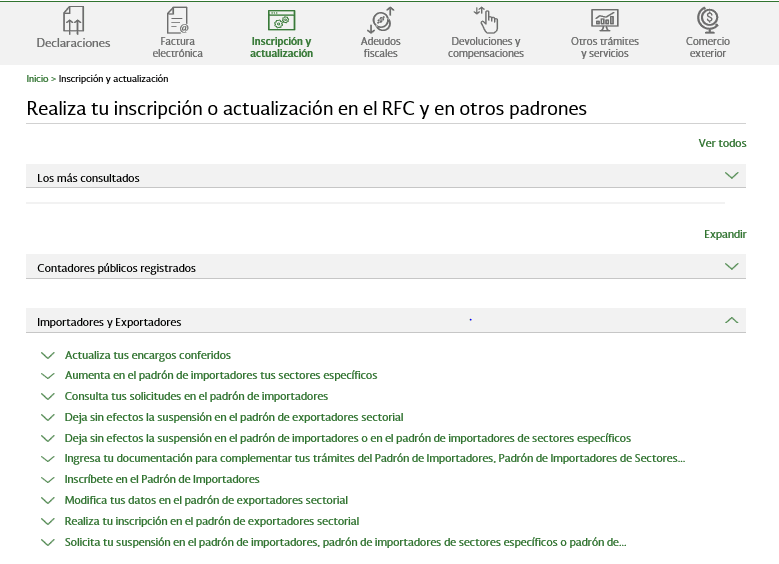
- Go to sat.gob.mx/portal/public/tramites/inscribete-padrones-rfc, pick Padrón de Importadores and, under pasos a seguir, Inscripción al Padrón de Importadores.
- Log in with e.firma or password; the form fills itself with your RFC data.
- Under Encargos que se confieren, enter at least one customs-broker license and its term — a valid license auto-fills the broker’s details. Click Continuar.
- Review the summary and hit Confirmar; sign with your e.firma (.key, .cer and password), Concluir solicitud and Generar acuse (PDF receipt).
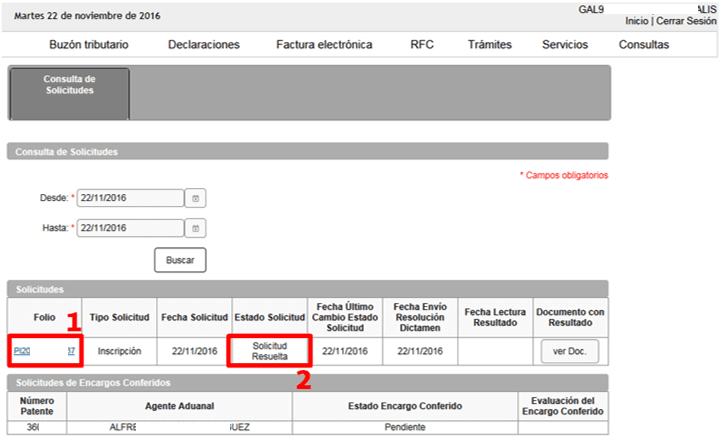
- Check the outcome on the same portal: Padrón de Importadores → Consulta el resultado de tu solicitud, pick the date range and Buscar. The official deadline is up to 6 business days (SAT form 5/LA); in practice it usually resolves in 1–3.
If you get denied or suspended
The most common causes: a tax address flagged “not located”, a negative compliance opinion, inconsistencies in your RFC. You fix the cause and apply again. A suspension can also come later — check your status before every important shipment.
What about the exporters registry?
It’s only required for specific sectors (alcoholic beverages, tobacco, minerals, among others). General exporting doesn’t need it.
Want to import and don’t know where to start? Write to us: we review your tax standing and get you ready to operate.