
The broker authorization (encargo conferido) is the electronic filing where you, as the importer, tell the tax authority (SAT) which customs broker is allowed to clear your cargo. Without it, your broker cannot transmit customs entries in your name — it’s one of the requirements that stalls a first import most often.
What you need first
- An active RFC (Mexican tax ID) and enrollment in the importers registry (padrón)
- A valid e.firma (Mexico’s e-signature, formerly FIEL) for the company or individual
- The license number (patente) of the customs broker you’re authorizing (your brokerage gives it to you)
Step by step, with the portal’s actual screens
The screenshots come from the SAT’s official broker-authorization guide — these are the real screens of the filing. The portal runs in Spanish; each caption tells you what you’re looking at.
- Go to sat.gob.mx → RFC filings → the Importers & Exporters Registry minisite → Material adicional → Actualiza tus Encargos Conferidos (“update your broker authorizations”) → Acceder.
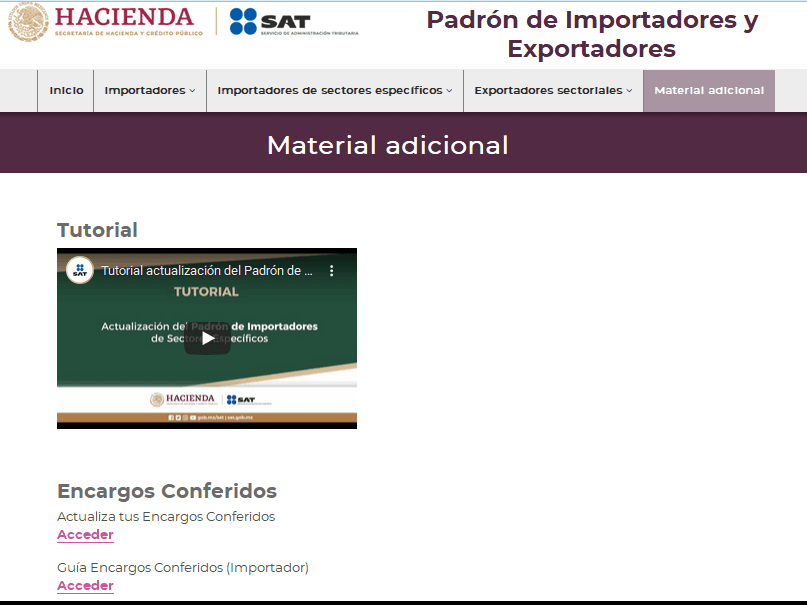
- Log in with RFC and password or your e.firma.
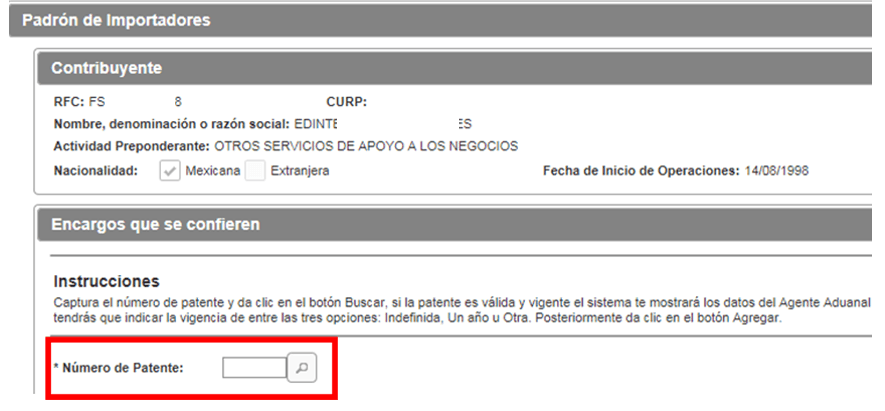
- The form loads your data. Under Encargos que se confieren (“authorizations granted”), type the broker’s license number (patente) and hit the search button — if the license is valid, the broker’s details appear automatically.
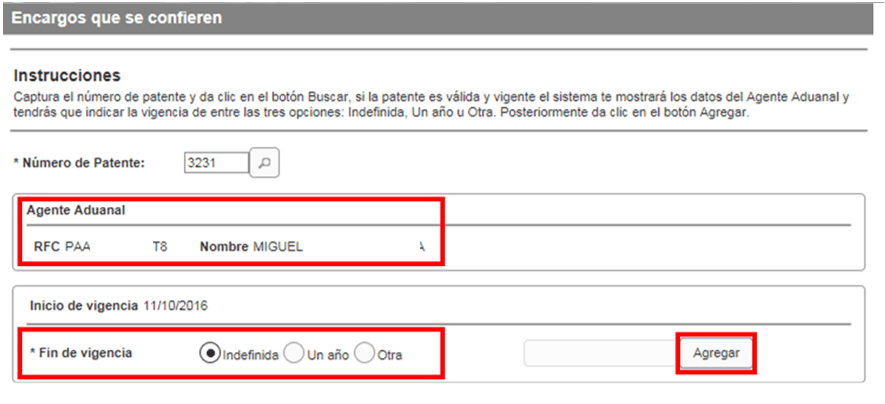
- Pick the authorization’s term — Indefinida (open-ended), Un año (one year) or Otra (custom range) — and click Agregar. Repeat for every license you need (rule 1.2.6 of the foreign-trade rules).
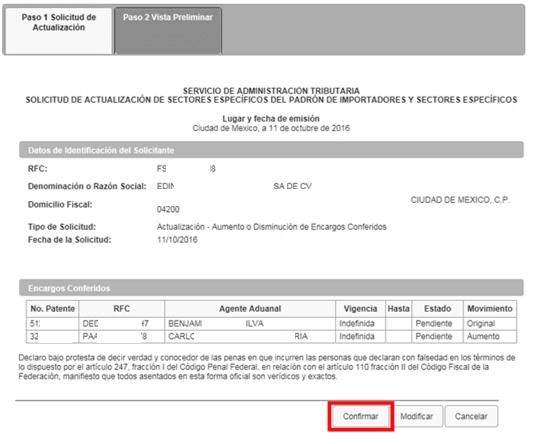
- Review the authorizations table and click Continuar; a summary of the request appears — if everything checks out, Confirmar.
- Sign with your e.firma (.key, .cer and password), click Concluir solicitud and download your receipt.
- Your broker then has to accept the authorization from their own portal access — give them a heads-up so the loop gets closed (until then, the status shows as Pendiente).
Common mistakes
- Expired e.firma: renew it first; it’s the #1 cause of rejection.
- Typing the license number wrong: confirm it in writing with your brokerage.
- Forgetting the broker’s acceptance: the authorization doesn’t take effect until they accept.
- A suspended importers registry: the authorization requires your registry to be active.
How long does it take?
The filing itself is instant; the broker’s acceptance usually closes the same day. Plan on 1-2 business days end to end.
Rather have us do it with you? Our team runs this filing every day. Write to us and we’ll walk you through it step by step.